![CoverForce_Secondary Logo (transparent).png]](https://helpcenter.coverforce.com/hs-fs/hubfs/CoverForce_Secondary%20Logo%20(transparent).png?height=31&name=CoverForce_Secondary%20Logo%20(transparent).png)
⛔ Please Note: CoverForce does not initiate or facilitate carrier appointment requests. You must already hold an active appointment with this carrier before completing the steps below.
Information You Will Need
Come prepared with the information below. Crum & Forster uses these details to recognize that a submission belongs to you, and having them on hand makes enabling your broker code and appointment for digital quoting quick and accurate.
- Agent Email: Email address of the primary contact at your agency for this setup.
- Agency Name: The legal name of your agency as it appears on your Crum & Forster appointment.
- Network or Wholesaler Name: The organization you access CoverForce through.
- Agency Address: The physical address on file with Crum & Forster for this agency.
How to Find and Enable Your Broker Code in CoverForce
Note: CoverForce has a new look and feel. Compare the screenshots below to what you see on your screen, then follow the matching set of steps.
🖥️ Original View (settings ⚙️ at the top of your screen)
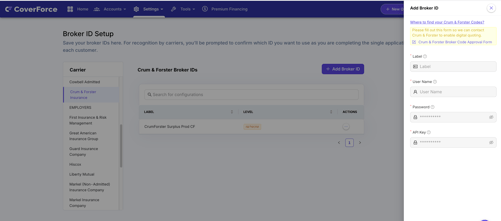
- Hover over the settings gear on the top navigation bar.
- Click on "Broker Configuration".
- Scroll through the carrier list and select the carrier you’d like to set up.
- Click "Add Broker ID" on the right side of the screen.
- Click the "Broker Code Approval Form" link.
- Complete and submit the Crum & Forster Broker Code Request Form.
✨ New View (settings ⚙️ on the left side of your screen)
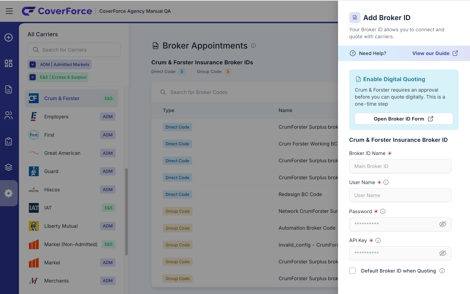
- Hover over the settings gear on the left navigation bar.
- Click “Broker Appointments”.
- Search for or scroll through the carrier you’d like to set up.
- Click “Add Broker ID” on the right side of the screen.
- Look for the Enable Digital Quoting box (blue-green).
- Click the “Broker Code Approval Form” link inside that box.
- Complete and submit the Crum & Forster Broker Code Request Form.
🎉 Ready to Submit?
Now that you have the information needed to enable your Crum & Forster broker code and appointment on the CoverForce platform, use the link below to complete and submit your request.
📩 What Happens Next
CoverForce submits your information to the carrier and works with them to activate your broker code. You will be able to quote with Crum & Forster once they confirm activation.