![CoverForce_Secondary Logo (transparent).png]](https://helpcenter.coverforce.com/hs-fs/hubfs/CoverForce_Secondary%20Logo%20(transparent).png?height=31&name=CoverForce_Secondary%20Logo%20(transparent).png)
⛔ Please Note: CoverForce does not initiate or facilitate carrier appointment requests. You must already hold an active appointment with this carrier before completing the steps below.
Information You Will Need
Come prepared with the information below. IAT uses these details to recognize that a submission belongs to you, and having them on hand makes enabling your broker code and appointment for digital quoting quick and accurate.
Direct Appointment (you hold your own retail appointment with IAT)
- Email: Email address of the person completing and submitting the form.
- Primary Producer Name: First and last name of the licensed agent who holds this appointment. Must match IAT's system exactly.
- Agent ID: The 4-digit code assigned to your agency by IAT at the time of your appointment (example: 1234).
- Agent Email: The email address associated with your IAT agency account.
Network or Wholesale Access (you access IAT through your network or wholesaler)
- Agent Email: The email address associated with your IAT agency account.
- First Name: Agent's first name exactly as it appears in IAT's system.
- Last Name: Agent's last name exactly as it appears in IAT's system.
If you are unsure of your Agent ID:
*Contact your IAT representative and ask for your Agent ID.
How to Find and Enable Your Broker Code in CoverForce
Note: CoverForce has a new look and feel. Compare the screenshots below to what you see on your screen, then follow the matching set of steps.
🖥️ Original View (settings ⚙️ at the top of your screen)
- Hover over the settings gear on the top navigation bar.
- Click on "Broker Configuration".
- Scroll through the carrier list and select the carrier you’d like to set up.
- Click "Add Broker ID" on the right side of the screen.
- Click the "Broker Code Approval Form" link.
- Complete and submit the IAT Broker Code Approval Form.
✨ New View (settings ⚙️ on the left side of your screen)
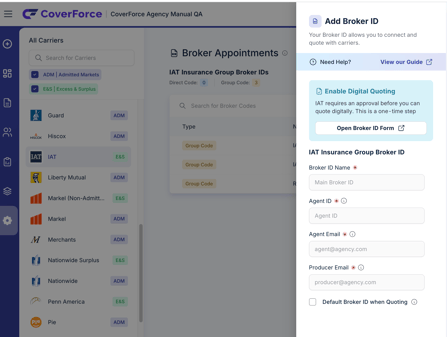
- Hover over the settings gear on the left navigation bar.
- Click “Broker Appointments”.
- Search for or scroll through the carrier you’d like to set up.
- Click “Add Broker ID” on the right side of the screen.
- Look for the Enable Digital Quoting box (blue-green).
- Click the “Broker Code Approval Form” link inside that box.
- Complete and submit the IAT Broker Code Approval Form.
🎉 Ready to Submit?
Now that you have the information needed to enable your IAT broker code and appointment on the CoverForce platform, use the link below to complete and submit your request.
📩 What Happens Next
CoverForce submits your information to the carrier and works with them to activate your broker code. You will be able to quote with IAT once they confirm activation.